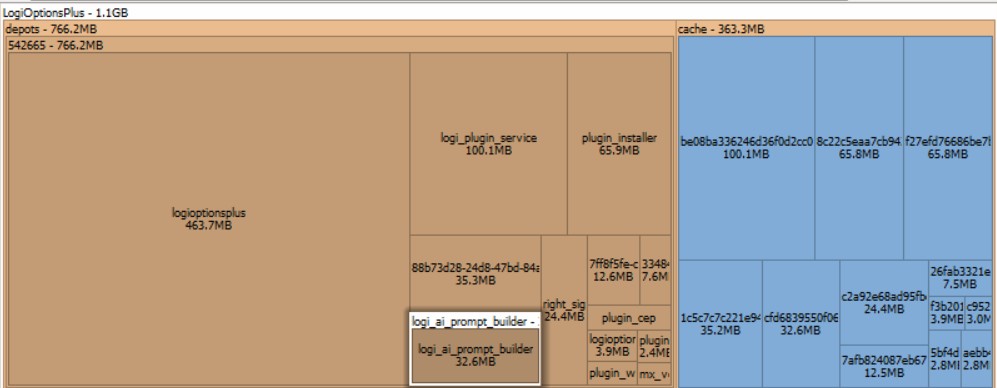
And of course they had to shoehorn some AI bullshit in it
(why I installed this driver: because i can remap the two extra buttons as copy/paste)
Don’t look up how much space Nvidia drivers take then.
Nvidia drivers at least do something that are fairly complex and heavy, and they’re necessary. Whereas this thing is just some comically overdeveloped and extremely annoying piece of bloatware from Logitech to remap a bunch of buttons.
deleted by creator
Space Sniffer gang represent!
deleted by creator
Maybe a Docker or two, perhaps a VM in the cloud. Is that still hip with the kids?
All the cool kids are running kubernetes
The actual driver for an HID USB device, even on WIndows, is still just a few KB.
Worse, the default driver for HID devices like mice, keyboards, joysticks, gamepads and so on is part of Windows since Windows 7 and all you had to do was give it an INF file that really just associated USB hardware devices that sent the PC a specific identifier (made up of a VID and a PID value) on USB protocol initialization, with that built-in driver - and that file is maybe 100 bytes. Even better, that INF file is not even needed anymore since Windows 10.
A driver for a mouse (pretty much the simplest Human Interface Device there is) that in addition to the normal mouse thing also supports setting the RGB color of some lights is stupidly simple because the needed functionality is already in the protocol.
Remember, modern digital electronics still uses really tiny processors sometimes with less than 32KB flash memory (and way less than that in RAM) only they’re microcontrollers rather than microprocessors now, hence the protocols are designed so that they can be handled by processing hardware with little memory (after all, many USB Hosts aren’t PCs but instead are things like USB HUDs which have microcontrollers not microprocessors)
I have no doubt in my mind whatsoever that almost the entirety of that 1GB is bloatware.
Anyone have other brand suggestions?
I’ve been using a Redragon M690 Pro as my home daily driver, and I retired my Razer Basilisk x Hyperspeed to my office, although the latter started having issues with middle clicking. The 690 is nice so far though. I don’t play any twitch shooters, more of a slow burn style, so ymmv.
I also like my Redragon mouse, a “Griffin M602A-RGB”. I picked it entirely because (a) the shape fits my hand well, with well-sculpted indentations for my thumb, ring, and pinky fingers, and (b) it’s cheap, but not so cheap it isn’t still decent.
Same actually. I got some nice RGB customization, it was comfy, had a right handed thumb rest, and the price was right. Only thing it didn’t have like the Basilisk was BT functionality, which in my use case wasn’t a deal breaker. Software wasn’t bloated either.
No, unfortunately. Logitech mice are the best performing in quality, battery life, and longevity at their price range. I’ve tried many other mice in the budget range, and they all fail quickly, eat batteries, or perform poorly in comparison.
I bought a couple Logitech mice a few years ago and I gotta say, they weren’t the best. The material they are made out of melts slowly over time. I use these mice and get sticky shit on my fingers. It’s not food or anything I’m doing. I’ve scrubbed them with rubbing alcohol and no matter what a little bit of sticky stuff is always coming off. So the finish on them isn’t great, at best. Never had other mice do this.
I had one that had rubberized sides that slowly did that over the years. After a decade? of daily use it finally started giving up. Most non-logi non-OEM mice I’ve used lasted months at best.
You described exactly my issue but it took under 5 years. Maybe 3? I’ve used $10 much much longer with only occasional hiccups like resolution issues on certain mousepads
I’ve been using super cheap 10 € Logitech mice since the dawn of time and I’ve never experienced that. What are you doing with your mouse?
I knew someone would blame me. Yeah the cheap ones are normal plastic and would never disintegrate. Kind of, again, like the other 28 mice I’ve used in my life. The expensive Logitech mice I bought are a rubberized plastic meant for comfort but they aren’t durable. Literally did nothing wrong or different but that sticky shit is the pits, so I won’t be buying anymore $180 mice. I hadn’t before these either.
My recommendation is the G305. Yes, a gaming mouse. But they’re both cheap and have an insanely good polling rate, so the mouse is smooooooth. Also, no rubberized nonsense to degrade.
It is either a type of rubberized material degrading or one piece of plastic in the group. Being a home-labber/gamer I have gone through a couple hundred mice easily. In addition to Logitech, I’ve had lots of stock MS/Dell/HP and even Sun mice. A few can get this condition with the materials. Often it will be a rubberized component, but sometimes it is a plastic part. Like the mouse wheel is a more common part that gets sticky, but the rest of the mouse is okay. Nothing happened other than it sat around for a long time. It could be that the last user had grubby fingers stained orange from cheetos whilst using that mouse and that lent somehow to the degradation. Hard to say. Plastic does degrade for sure and maybe our grubby mitts help?
Baaack in my day we got a driver for our mouse on a single DD floppy…
It wasn’t too long ago that a USB mouse would store the divers on the mouse.
You’re thinking of the Titan submersible accident, I think. But they ended up stored on a Logitech controller, not a mouse.
That was actually never the case. The default USB mouse driver comes with the OS. And also today any modern mouse will work just fine with the default USB mouse driver in the OS.
What this abomination is is a kind of extended driver that allows the user to e.g. remap buttons on the mouse or control RGB lights. You know, anything but the actual basic functionality of the mouse.
X mouse button control
It can’t detect some of the fancier buttons and gestures but it can often pickup buttons 4 and 5 for remapping, and it does chording and long press options to give you multiple functions without any AI bullshit.
Actual driver code: about 500KB. If that.
500KB used to be the entire OS, application, drivers, and user data. Oh well.
They didn’t have mice that far back.
The original Macintosh had 128k of ram.
RAM is active. It doesn’t hold the entire OS when in use even now.
The entire MacOS including finder and the tools was 216KB on the 400KB floppy.
um wut
Saving this to share at work. What an abomination that, I am sorry you have to deal with it
,
I have several Logitech peripherals. Why in the fuck does it need AI?!?!
Because CEOs.
To communicate with the 5th version of software they have somehow released between the time the product was created and you bought it.
I mean, this was their idea last year…
I feel like “AI Mouse” is right up their alley.
LOL.
maybe this will help, if you wanted to ditch the logi driver:
https://github.com/pwr-Solaar/Solaar
Solaar is a Linux manager for many Logitech keyboards, mice, and other devices that connect wirelessly to a Unifying, Bolt, Lightspeed or Nano receiver as well as many Logitech devices that connect via a USB cable or Bluetooth. Solaar is not a device driver and responds only to special messages from devices that are otherwise ignored by the Linux input system.
Saving this for later.
take it to the bushes.

Bewbs
I hope one day theres something similar to this, but for 8bitdo.
I have an 8bitdo keyboard, and in order to map my buttons, I need to boot up a windows 10 hard drive, do my one time edits, save them to the keyboard, and THEN I can turn off the pc, swap back to my ZorinOS hard drive, and THEN I can go about as normal.
And if for some reason somethings wrong, or didn’t take, I’d have to repeat the whole process all over again.
All because the keyboard manager doesn’t work on linux. But it’s not logitech.
I have a Flydigi gamepad and I can use a virtual machine with tiny11 to change the configuration. The connection isn’t super stable but for the few times I have to do it, it works.
Sell the 8bitdo keyboard and buy one instead that is capable of running with QMK or ZMK firmware and is configurable by either VIA or VIAL.
…now are those real words, or are you picking out random spoonfuls of alphabet soup?
I’m going to assume these are open source apps because for some reason that’s how those guys like to name stuff.
Wait for YaQMK and vmk-ng then YaVMK-ngx, which will be forked to yaamksubwthn
QMK and ZMK are FOSS firmwares that can run on Atmel AVR and ARM chips like the RP2040.
VIA or VIAL are config utilities that you can use to remap your keyboard on the fly.
Trust the process. Just buy a VIA or VIAL enabled keyboard and enjoy ra easy graphical setup.
Wooting keyboards are also really nice, and are configured through a web interface. It’s also a Dutch company, so if you want to buy European it’s definitely a good choice :)
A web interface? Is the keyboard running a webserver or is it remotely managed by the manufacturers website?
I’m confused about configuring keyboards via web app.
piper is also great. openrgb works too if all you want is to change led colors.
The software, afaik there is no actual driver involved.
Huh, neat
Madness