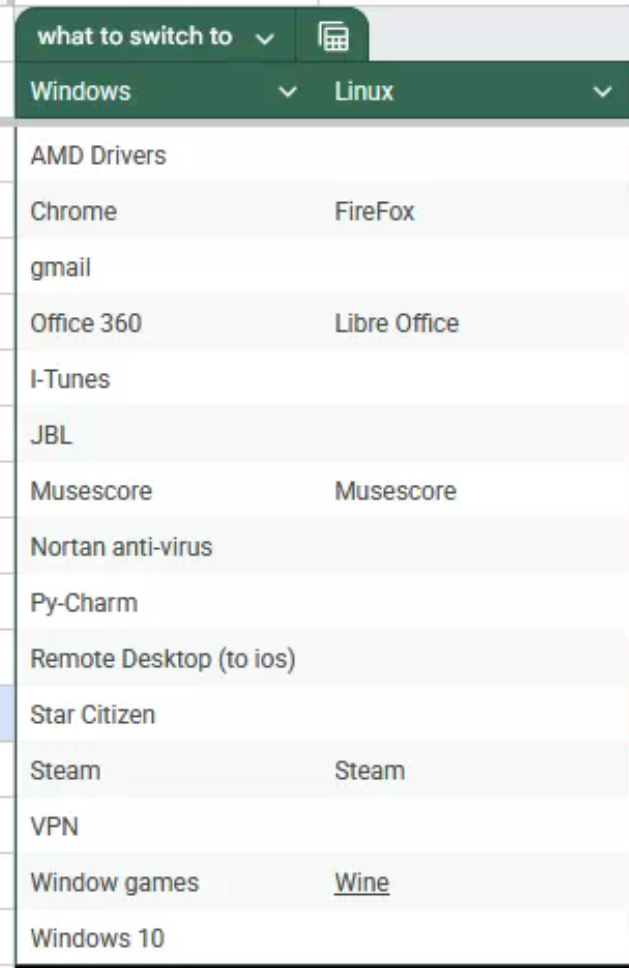
Approaching the end of window 10 and have no plans on upgrading to 11.
I am trying to find alternatives to applications I regularly use before jumping ship (it is mostly a gaming focused pc) any suggestions?
There’s oculus software for my vr but don’t know what I’m going to do with that
Small update: probably going to do Linux mint as that appears to be the most beginner friendly
Update two: that’s a lot of comments, and Thanks for all the info
The linux ecosystem, depending on which distro you choose, has anywhere from tens of thousands to hundreds of thousands of packages. There’s only select software that you can’t virtualize from Windows to Linux, so you may not even be required to find alternatives.
But without listing any software at all, it’s hard to tell you definitively…
Wdym software, it’s what the left column is for
Is the image is not showing?
Remote Desktop to iOS: I use moonlight/sunshine and it works great
I think providing a list of those applications might be a first step 😉
Is the image not showing? Left Column is all the windows application I use regularly
It was not. Seems to load now.
- AMD drivers are built-in, so no issues there.
- Don’t know what “JBL” is
- Gmail is web-based
Everything else is fine. Shouldn’t have any issues.
AMD drivers: Native, will auto-install as the mesa library, AMD is tits in Linux, it just works.
Gmail: Thunderbird works with Gmail accounts and can sync the calendar.
iTunes: Rhythmbox has a very similar layout to iTunes and so should feel pretty familiar.
Anti-virus: Linux doesn’t really need antivirus in the same way Windows does because it’s more locked down and doesn’t have the same vectors of attack. If someone is hacking a Linux machine, it’s a corporate server, not your desktop PC. If you still think you might need one ClamAV is available for Linux distributions. (.deb for Debian derivaties and .rpm for Fedora derivatives)
Py-Charm: As others have noted, Python is installed natively and is usually already implemented “out of the box” on a fresh install. No need for a program to run it, Python is just… there already.
Remote Desktop: Whatever distribution you have will likely also come with a Remote Desktop client. I am unaware of whether or not they will connect natively to iOS.
Star Citizen: You should be able to add this as a non-Steam game to Steam and use Steam’s Proton compatibility layer to play it. A few years ago they were literally asking for Linux players to test it with Proton and Easy Anti-Cheat.
VPN: Linux has extensive VPN support including “roll your own” through either OpenVPN or Wireguard.
Windows Games: Steam, using the Proton compatibility layer, which is essentially WINe, just made a little easier. As with Star Citizen, just add it as a non-Steam game and viola.
Windows 10: The Distribution of your Dreams is just around the corner… Mint isn’t a terrible place to start.
As with Star Citizen, just add it as a non-Steam game and viola.
You need a viola these days to run a game on linux?
And people are wondering why Linux is less popular :p
That’s where I’m going wrong! I’m missing the viola. Hopefully my distro has it in their repo!
PyCharm is a Java application. And it runs perfectly on Linux.
Depends on your setup. If you use a 4k screen with fractional scaling in Gnome, Pycharm and all Jetbrain editors have blurry text and run under xwayland.
But vs code works fine, also zed and many others.
I believe you can force pycharm to launch using Wayland. There’s some option you can pass to it when you launch it.
Py-Charm isn’t a Python interpreter, it’s an IDE. It has a purpose.
I think the biggest thing about itunes is that it can be used to write music to iphones and do OS restores, I couldn’t get the usb functionality to work with wine so I just use it in a vm personally
If OP is a gamer and not too comfortable with Linux, Bazzite is a good choice of distribution.
It’s a so-called “Atomic” distro. Basically what that means is that it works more like Android / iOS than Windows or a traditional Linux distribution.
The base system including drivers and key applications is built as an image by Fedora. Every 2 weeks or so, they release a new one, and Bazzite users get the new one the next time they reboot. Everything in that base image is tested to work together, so you don’t get weird incompatibilities. You can still install all the other software you want, but you tend to do it using Flatpaks rather than rpms/debs. (For someone who doesn’t know what that means, Bazzite is a nice OS because that’s something you don’t need to learn right away.)
Bazzite is meant to be something that you can install on a SteamDeck, or another handheld gaming PC, but it also works great for desktop machines. But, because it’s meant for handheld machines, they’ve worked extra hard to sand away some of the rough edges.
If you’re a more advanced user, Bazzite is still good because you can still do almost everything you’d do on a normal distribution, you’re just discouraged from doing things that affect the base image because it makes updates slower and means they’re not guaranteed to work. I actually really like some of the things you’re encouraged to do in Atomic distros that you wouldn’t do normally. For example, using distrobox as a way to install certain kinds of dev tools. I currently have one project I’m running in an Ubuntu distrobox and another I’m running in a Fedora distrobox. It keeps some of the tools isolated to the “box” where they’re needed. I haven’t used Fedora much lately, so it’s fun to have the more familiar Ubuntu environment in one, and then the other one where I can experiment and learn.
For someone who doesn’t play games, Bazzite probably isn’t ideal, but I’d still recommend an Atomic build. There are downsides, but unless you’re the kind of person who really likes building their own kernel and making sure it’s optimal for their system, it’s so nice to have a stable base image so you can focus on the other stuff.
Star Citizen works great on linux with Lutris. https://lutris.net/games/star-citizen/
nearly, it’s too bad they’re hung up on wine 8 default. have to manually switch to proton since 8-26 is too old
Using either ProtonUp-qt or ProtonPlus you can install newer/alternative Proton versions, including one optimized for Star Citizen
but alas that isn’t automatic. if things don’t work out of the box it’s a point against Linux every time
“VPN”? Which?
Use Norton right now
Adding to this, don’t use Norton or any other anti-virus provided VPN.
Mullvad works great and has an app.
NordVPN works also great. I use KDE and there was a plugin to manage NordVPN from the task bar.
Drop Norton, full stop.
Take a look at https://www.privacyguides.org/en/basics/vpn-overview/ to get a better overview of what you need to look for in a VPN.
If you’re not tied to it there are other options that with great on Linux. Mulvad for one.
PyCharm is cross-platform, so you can use it on Linux.
Idk why everyone says python is native to Linux. Pycharm is ab IDE. It has nothing to do with a preinstalled python instance.
Yes, and in fact, the complete jetbrains toolbox works fine on Linux. Setup is commonly done by simply unzipping an archive.
It is somewhat related, I’m sure installing pyCharm on windows also provides Python. But yeah, not everyone wants to use a plain text editor.
OP is asking how to install an IDE. People are telling him Python is preinstalled. It’s like someone asking for a terminal emulator and people saying „but zsh is installed“. It’s being obtuse, is what it is.
Antivirus is completely unnecessary and terrible on windows and linux… and on linux it’s uniquely useless. Everything is installed from a centralized repo, antiviruses won’t be of any help at all. antiviruses came about because windows let executables just be run easily and simply and used them as the default way of installing software, this was beyond idiotic and the reason that OS became infested with malware. Linux never made that mistake from the start, and so antivirus is unnecessary.
Norton is basically just malware, however.

The real reason you won’t need antivirus.
Can you explain how that works?
Sorry for my ineptitude
On windows you install things from random websites as the primary method of installing stuff, this means anything can install anything and has installers that can install bonus stuff. This is why windows has so much malware.
On linux, imagine your distro is an app store, ubuntu is an app store, mint is an app store, fedora is an app store. The apps themselves can’t manage installation so they can’t bundle nonsense with them. you just click install and you get only the thing you wanted and nothing else.
Since your distro curates all the software, as long as you trust your distro, you’ll know there’s no malware on your computer, because you get all your software from the distro (or flathub but same idea).
You can install things from random websites for Linux too, though.
You can, but on windows it’s the standard way to do things, on linux it’s almost never done.
The security model is also very different between Linux and Windows. Linux is just inherently more secure.
True for wayland, not true at all for x11
It’s true for any variation of Linux. Hell, the vulnerability (Mimikatz) that was crucial in the most expensive cyber security attack in history is still there in Windows.
And for X11 to be exploited you would need to get and run malicious code in the first place. The Linux security model kicks in before you get to that point.
9 times out of 10 the software you’re looking will typically land in your Distribution’s repository, before it lands in the main repository it’ll be vetted for stability and security in a testing repository.
For example Steam-Installer is located in the Debian main repository for Debian 12 (Bookworm) they also have a copy in their Debian 13 (Trixie) repository for testing the next generation of Debian..
If you want to install software outside your distributions repository you will need to vet the software yourself and make sure it’s compatible with your distro.
Hope that explains it a little easier.
*Nortan
Linux Mint or Nobara would be great beginner distros and would each be great for gaming. If gaming is more important, I would lean towards Nobara. If general use is more important, Mint.
Keep in mind that you can try most of these out in a Virtual Machine. Some others to consider are PikaOS and CachyOS. I’m also working on my migration, and I install and set up everything with each ISO as if I was doing it for real, to see what hiccups I might run into. It will be slower, but it’s just a trial run, so just expect things to be faster when you do it for real!
Chrome is available on Linux. Norton is spyware. And there is an Apple Music web app that you can use. And try Fedora first.
Chrome […] is spyware. Don’t use chrome.
iTunes: Quod Libet
pyCharm: native
Windows games: Proton
Proton vs wine what’s the difference?
deleted by creator
.Work with non steam games? Also yay valve
Yep! In steam, Add Game > Add Non-Steam Game > Select the Game. Then in the game’s properties, go to the compatibility section and choose “Force the use of a specific Steam Play compatibility tool”, which will then run the game under Proton.
That said, I actually run a number of games under Wine. The Heroic Launcher covers GOG, Epic, and Prime games, and will install them with Wine enabled for them by default.
Awesome. (don’t use any of the other game platforms) but that’s good to know
It’s worth buying games on GOG instead of Steam where possible. Games on GOG are DRM-free, so you can download the installer and keep a backup of it, and it’ll work indefinitely.
It does. The simplest way to use Proton with other games is to add each as a non-Steam game to… Steam. But there are also CLIs for it.
Will be using that then
It’s worth looking into Lutris for non-Steam games as well. Comes preinstalled with Bazzite (heavily gaming-optimized Linux distro), though I don’t have any non-Steam games to try it on since Steam works fine for all the games I play.
Only have two nonsteam games I play (Minecraft has a Linux version already) and Star citizen
Also want to add that you can add a non-steam .exe and install some windows applications too, not just games. After installing you just remove the installer from steam and point Steam towards the installed applications .exe
Just make sure to tell Steam to use proton to run it. By default, it does not turn that on.
Proton is let Valve make an optimized Wine setup for you through Steam
Proton is Wine but tweaked for the sole purpose of running games, so it packs a bunch of extra stuff needed to make games run well together.
Usually there’s also a long list of per-game tweaks and changes to make sure it runs, it’s all preconfigured so you press play in your launcher and it works. Not need to change settings whenever you want to play a game.
You can still use regular Wine but you’ll have to set up a bunch of stuff yourself, and eventually you run into a game that needs a different version of something that breaks another game, you get into prefix management and it’s a mess. Or oh this game runs better when we pretend to be Windows 7 but this one works best with Windows 10. Proton just does it all for you, every game gets its own space with all the correct settings from the get go, and you just launch into the game and play.
I just switched to linux mint and the install was a lot easier than i thought. Works fine. I love the customization, the lightweight OS and its quite easy to use. Barely needed to use the terminal. The only problems i’ve faced is discord screenshare not showing my cursor and time to time lagging my games, and gaming, mostly played deadlock, has in my experience came with some bugs.
Keep in mind that wine works not only with games, so if you need to run some windows program you can use it too
JBL sounds like your audio gear, depends on what. Bluetooth, USB audio ot 3.5mm jack connections generally work fine without issue. (Installing PulseAudio Volume Control will help you with finer grained volume control). Some DACs that require custom Windows drivers might not work.
Gaming stuff, Steam will have you covered, Lutris, Heroic, or itch.io for non-Steam stuff. The one unintuitive thing you have to do once you log in is to go to Steam Settings and check the “Use Steam Play for All Titles”. Just like that, 75% of your library that only have a Windows version will suddenly be playable and you’ll hardly notice a difference: just Download then click Play, that’s it (maybe a bit slower launch time).
I would recommend Firefox or Librewolf over Chrome as you have done already, but you should know that Chrome and Chromium do work on Linux FYI.
What is JBL?
Speaker brand, they may be looking for some software for managing it. Probably gonna need to run it in WINe.
I highly doubt this will work in WINE. This type of software almost never works in WINE.
I’m familiar with the speaker brand, but OP is not clear what they mean. Is there software or do they just want to make sure their BT speaker works with Linux? Or are they using some other abbreviation and we are way off base.
I can guess but better to ask.